 Need Help?
Change your Email Address and Password
You can easily manage your own email address and password for Knit it Now.
From your account page click the button "Update Email/Password"

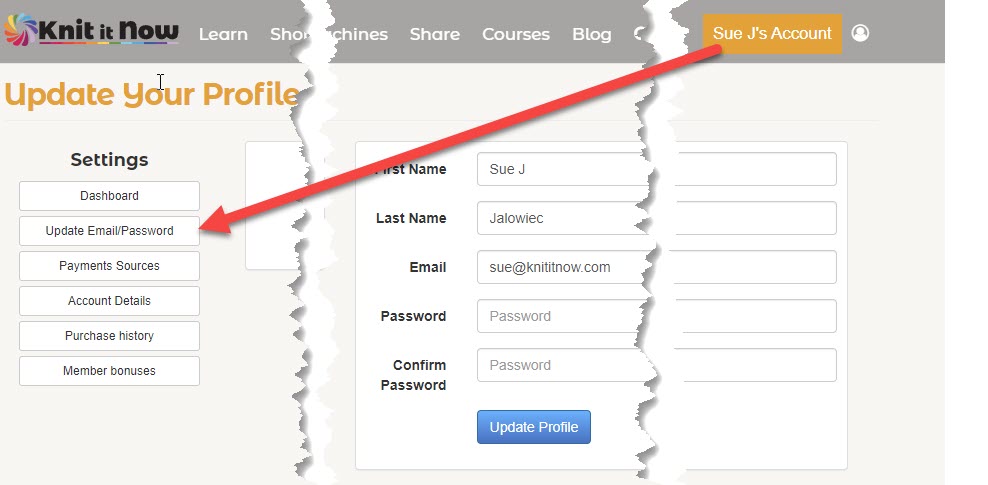
NOTE:From your account page click the button "Update Email/Password"
If you no longer wish to receive our weekly correspondence, click the "unsubscribe" link at the bottom of every email we send.
Why do we ask you to log in?
Why don't you remember me?
How to tell if you are logged in:
As a user of this membership site, you have access to both free and paid material. We simple ask you to identify yourself. We don't sell, rent or share your information.
Why don't you remember me?
The website sets "cookies" on your computer so you don't have to log in every time. They are set to expire in 30 days. If you haven't visited in a while, you'll need to log in again.

How to tell if you are logged in:
- Desktop Look for your name at the top right of any page
- Mobile Look at the top right for the login prompt
Memberships
A subscription to Knit it Now includes:
- Machine Knitter's Success Path
- Learning Library: 500+ tutorials
- Topic Focused Classrooms
- 260+ Dynamic Patterns
- Premium Charting Tools
- Free and Discounted Courses
- A PREMIUM Membership includes access to ALL 30+ courses as long as your Membership is active
We hope that we've inspired your knitting and you will continue to be a part of our community.
Once your membership expires:
Once your membership expires:
- You will no longer have access to the Learning Library
- Anything you've purchased remains in your library.
- Any bonus items, Stitch Patterns, Free Home Study Courses, traditional patterns will no longer be available.
- Any Dynamic patterns you've built (entered gauge) will be available to you and you'll be able to re-size them as many times as you like.
- Dynamic patterns that you haven't used will no longer be available.
- You will no longer have access to the Premium Knitters Math tools
- Premium Members will no longer have access to the Courses.
Great question! Here's the thing we do offer a TON of free video trainings, tutorials, and how-tos on our website and you are most welcome to watch them and learn at no cost.
However, the Knit it Now membership not only gives you access to frustration-free training, HUNDREDS of tutorials, Charting Tools, Quick Wins and Hundreds of customizable Dynamic Patterns.
You save dollars and hours because you don't have to purchase everything separately OR waste time trying to find the right files or get answers when you're stuck on a project.
Offering ALL this support and resources to you requires us to support our team, invest in tools, and of course, spend time to share with you.
We charge a small fee for the membership so we can continue to provide an overwhelm-free, support-filled path to mastering your knitting machine.
However, the Knit it Now membership not only gives you access to frustration-free training, HUNDREDS of tutorials, Charting Tools, Quick Wins and Hundreds of customizable Dynamic Patterns.
You save dollars and hours because you don't have to purchase everything separately OR waste time trying to find the right files or get answers when you're stuck on a project.
Offering ALL this support and resources to you requires us to support our team, invest in tools, and of course, spend time to share with you.
We charge a small fee for the membership so we can continue to provide an overwhelm-free, support-filled path to mastering your knitting machine.
Languages
Use the small CC icon at the lower right of a video for a text transcribed and translated version of the video.
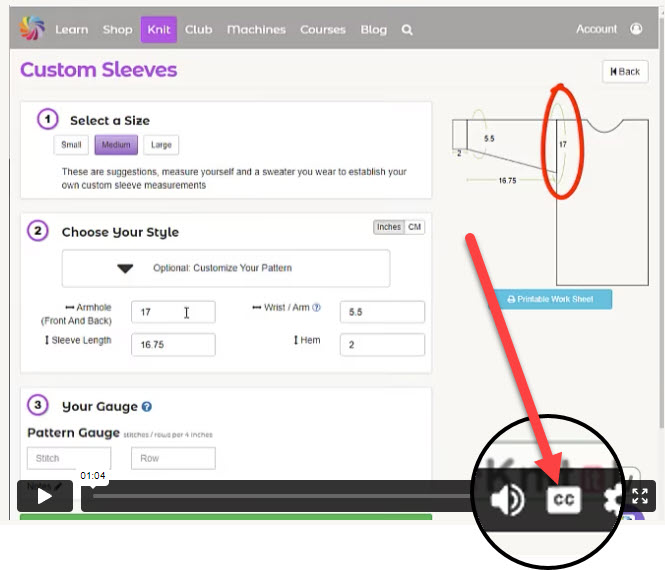
Our site is written in English, but many of our knitters use browser translation tools to read content in their preferred language. See how easy it is to translate the site.
General Knit It Now Info
No, we do not sell DVD's. All of our content is online.
We do not offer an option to print the Learning Library lessons.
- Knit it Now is and on-line application. Being on-line there is no "errata" page. Errors can be quickly corrected and additional information can be included quickly. Your lessons and reference material are never out of date!
- In response to requests, we will include stitch charts and other materials in printable form when we can
- To protect our contributors (and to stay in business) we are constantly on the lookout for those unfortunate few who think that a subscription gives them permission to share Learning Library and pattern content.
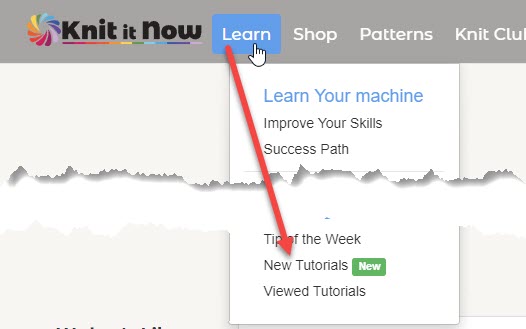
When new content is added it is automatically marked "new" for 30 days.
If significant changes have been made to a technique or lesson it is marked "Updated" for 30 days.
Knit it Now DOES NOT have a storefront. We are an online resource only
Please inspire other machine knitters by sharing your "wins".
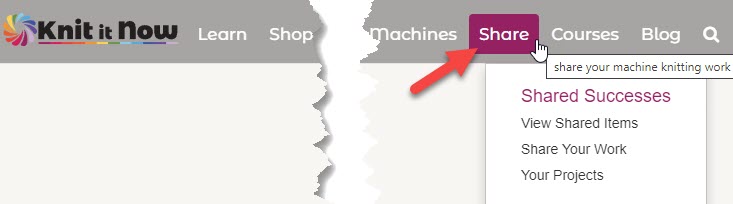
- Use the "Share" button on the main menu (top of every page). You can upload photos of knitted items made using Knit it Now Patterns. Use your desktop or phone.
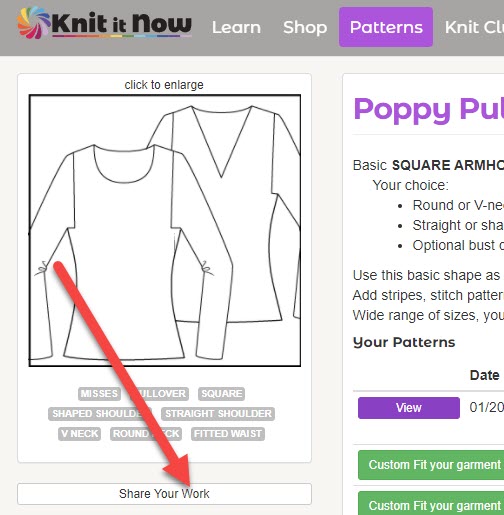
- Use the "Share" button on each pattern page.
- In the Knit Club Community, use the category "Share your Wins".
To inspire your knitting:
- We curate knitting designs from the hand knitting world. (These are used with permission from the owners.)
- We make suggestions as to how you can use the inspiration from the design with your knitting machine.
- You can purchase the original yarn and pattern ~OR~ you can choose your own yarn and use a Knit it Now pattern
Knit-alongs are an opportunity for Members to focus on a specific topic.
Previous Knit-alongs are available for members.
- Work at your own pace, using targeted Knit it Now course materials.
- Ask questions in the Forum
- Join our Live Q&A Zoom calls (or watch the replays)
- Share your successes
Previous Knit-alongs are available for members.
Dynamic Patterns
Dynamic pattern generator ... doing the math for you ... very precise formulas. Aren't you glad you don't have to work out all the calculations?
Unlike traditional patterns, we are not limited to fitting a pattern on a single page. We don't need to fit it into the design of a book's pages.
Our goal is to create easy to read patterns without abbreviations and "code" to translate. When appropriate we offer both charts and written instructions.
You don't have to print all the pages! When printing a PDF, you can choose which pages you want to print. You can also navigate our PDF format patterns using Adobe Reader's bookmark and thumbnail features
TO PRINT ONLY THE PAGES YOU WANT:
Our goal is to create easy to read patterns without abbreviations and "code" to translate. When appropriate we offer both charts and written instructions.
You don't have to print all the pages! When printing a PDF, you can choose which pages you want to print. You can also navigate our PDF format patterns using Adobe Reader's bookmark and thumbnail features
TO PRINT ONLY THE PAGES YOU WANT:
- In the print dialog, separate the pages you want to print with COMMAS - 1,4,6 will only print pages 1, 4 and 6
- Enter 1-4 and pages 1,2,3 and 4 will print(use a DASH)
Knit it Now patterns are designed as "blueprints"
Use the basic shape and substitute your own stitch pattern. Knit it Now doesn't know what stitch pattern you use, it is doing the math and providing the numbers for you based on YOUR stitch and row gauge. The instructions read "cast on in pattern" and "knit straight in pattern".
Remember in consider stitch multiples when planning your knitting.
Use the basic shape and substitute your own stitch pattern. Knit it Now doesn't know what stitch pattern you use, it is doing the math and providing the numbers for you based on YOUR stitch and row gauge. The instructions read "cast on in pattern" and "knit straight in pattern".
Remember in consider stitch multiples when planning your knitting.
Fit of a garment is a personal choice. You may like your sweaters skin tight (and have the figure to pull it off), but others feel they need a bit of "wiggle room" to be comfortable.
Knit it Now Sizing charts indicate the BODY MEASURMENTS that are used to size our garments.
The pattern sizes and dimensions listed are garment FINISHED MEASUREMENTS. The amount of ease is up to you.
We recommend measuring a garment you wear and copy those measurements.
Knit it Now Sizing charts indicate the BODY MEASURMENTS that are used to size our garments.
The pattern sizes and dimensions listed are garment FINISHED MEASUREMENTS. The amount of ease is up to you.
We recommend measuring a garment you wear and copy those measurements.
- If you prefer to print your patterns without color, set your printer to "print all colors as GREYSCALE". In the print dialog box for your printer, there is a tab where you can make this change. Don't use the "print all colors as BLACK" setting.
- Save paper and ink. Get familiar with the setting in the print dialog box for your printer. In the print dialog box, you can choose which pages to print. Don't want to print the first page? Enter 2-5 and pages 2,3,4,and 5 only will print. Only need pages 2 and 5? Enter 2,5 and only these 2 pages will print
We're human, sometimes we make mistakes. We're also constantly adding new content, DAK files, videos and educational information.
Instead of having to research errata for patterns you own, Knit it Now alerts you of pattern changes. If we find a major error, we'll send you an email. For updates like an added video, you'll be alerted in your library the next time you view your pattern.
To receive your updated pattern, simply re-size it and the newly generated PDF will contain all changes.
Want to know what changed? Click the link and the notes about updates will display.
"To err is human, to forgive is divine"
Instead of having to research errata for patterns you own, Knit it Now alerts you of pattern changes. If we find a major error, we'll send you an email. For updates like an added video, you'll be alerted in your library the next time you view your pattern.
To receive your updated pattern, simply re-size it and the newly generated PDF will contain all changes.
Want to know what changed? Click the link and the notes about updates will display.
"To err is human, to forgive is divine"
Dynamic Patterns are a collection of knitting patterns that are generated mathematically:
- They are designed so the knitter can use any yarn in any gauge. All the math is done for you, so you can get down to what you love ... knitting!
- Each pattern generated is printed in a single garment size, reducing the clutter of unused sizes on the page.
- The patterns can be re-sized as often as you like
- The patterns can be generated multiple times in different gauges.
- Electronic shape and stitch files (DAK) are included when available
- Links to tutorials are included in the pattern where appropriate
Purchased Patterns:
There is no time limit for using any patterns you purchase.
Members:
All of Knit it Now Patterns are available for you to use with no limits while you are a member.
If your membership lapses, any patterns you've built (entered a gauge) will remain available for you to use. But you will no longer be able to build new patterns.
There is no time limit for using any patterns you purchase.
Members:
All of Knit it Now Patterns are available for you to use with no limits while you are a member.
If your membership lapses, any patterns you've built (entered a gauge) will remain available for you to use. But you will no longer be able to build new patterns.
All patterns you have purchased or used as a Member are stored in your personal library.
The easiest way to find them is use the menu >Patterns (knit) >Your Patterns
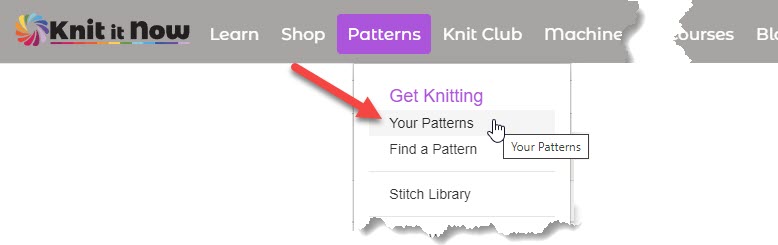
The easiest way to find them is use the menu >Patterns (knit) >Your Patterns
Searching
Find a helpful trick or technique? Tag it!
Create your own on-line reference library with Knit it Now. Tagged items are highlighted with the tag icon
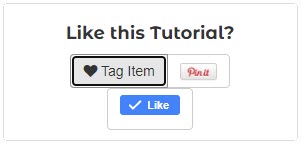
Your collection of tagged items can be found in your personal library. From the home page click the "my tagged items" button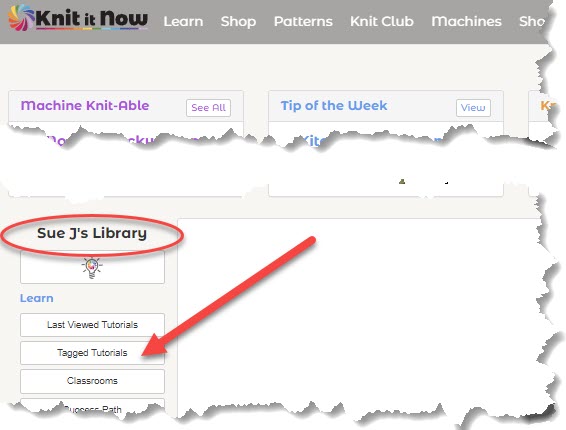
Create your own on-line reference library with Knit it Now. Tagged items are highlighted with the tag icon
Your collection of tagged items can be found in your personal library. From the home page click the "my tagged items" button
Knit it Now is a collection of a number of large databases. Think of them as "buckets" of information.
To more quickly search through all the data on the site, we've designed a search page that you can use to find your keyword in each bucket.
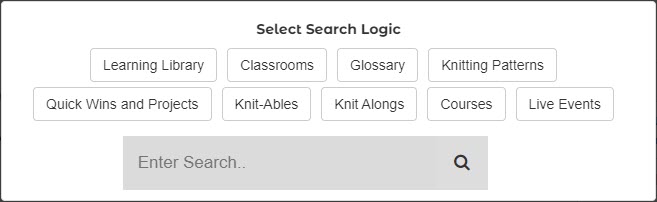
To more quickly search through all the data on the site, we've designed a search page that you can use to find your keyword in each bucket.
What's new???
Shopping Cart
We accept all credit cards and PayPal.
We use Stripe to process our memberships.
To keep your information secure, we do not store your credit card information.
We use Stripe to process our memberships.
To keep your information secure, we do not store your credit card information.
Yarn sales are final. No returns are accepted.
Videos and Technical Stuff
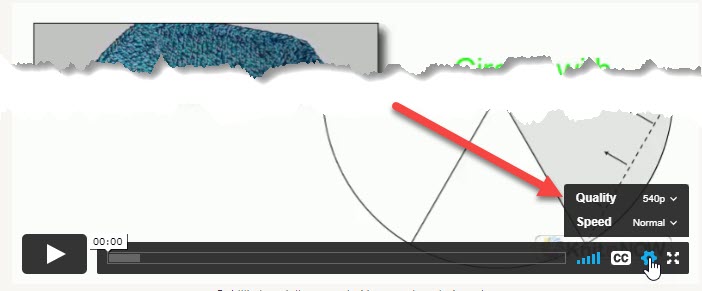
Try to manually lower the video quality.
(click the “HD” logo in the right hand corner of the video player and click a lower resolution).
If this doesn’t work, please clear the cookies and cache in the browser that you’re using and then log back in and try again.
If you are still having trouble Include the following information
If this doesn’t work, please clear the cookies and cache in the browser that you’re using and then log back in and try again.
If you are still having trouble Include the following information
- Can you view other videos? Is it just a specific video that is a problem?
- What device are you using?
- What browser are you running?
- Any other information you can provide can be helpful

The notification will display in your browser even if you aren't visiting Knit it Now.
If you wish to stop receiving push notifications, click the gear icon to change your browser settings.
Need help? Visit the software website for more details
https://www.pushengage.com/blog/how-to-unsubscribe-from-chrome-push-notifications-in-3-easy-steps/
Or use the button at the lower left corner.

A knitter reported that when building patterns she was continually required to log in. She was using Safari.
We discovered that this was related to cookies and her privacy settings.
On an i-Pad:
We discovered that this was related to cookies and her privacy settings.
- In Safari, click Safari then preferences
- Select the privacy tab then uncheck the "Prevent cross-site tracking" box
- Restart Safari
On an i-Pad:
- Go to settings
- Safari
- Uncheck "prevent cross-site tracking"
- restart Safari
 Need Help?